


Weather Live°
4.430.30K Reviews
App Specs
- Version
- 7.8.6
- Updated On
- License
- Free
- Downloads
- 50,000,000+
- Developer
- Mosaic Srl
- Categories
- Weather
- Platform
- Android, iOS
Screenshots
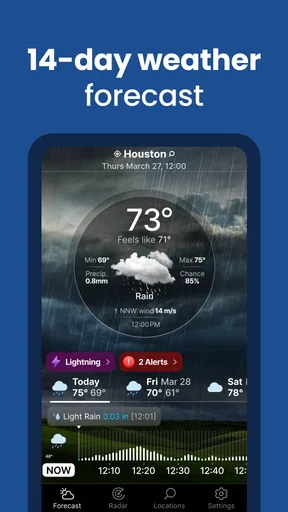
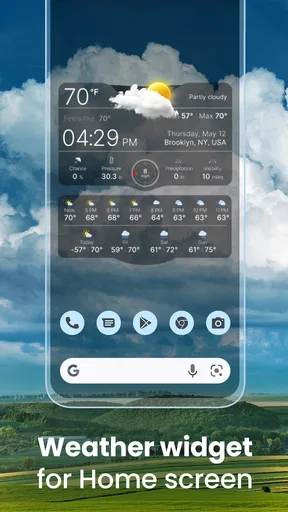
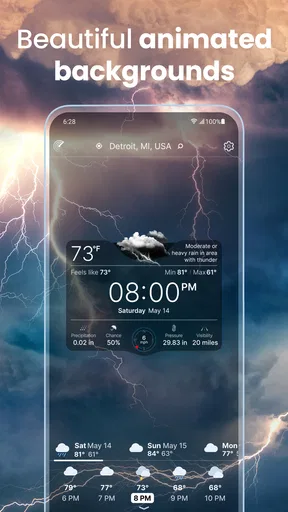
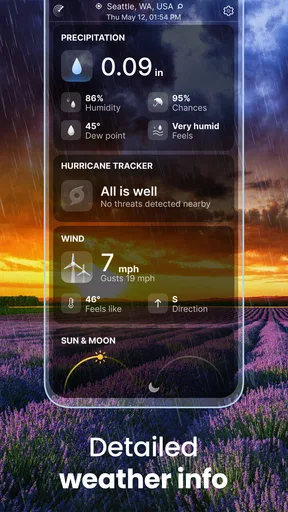
 Analysis by AppCompare
I tend to judge a weather app by a simple question: does it help me make a better decision before I leave, without making me dig through screens? Weather Live° is built around that everyday need. It puts current conditions and forecasts alongside weather details for people who want more than a temperature, while keeping the main experience approachable. In my use, its strongest appeal is that balance: enough information to plan around changing conditions, without requiring a meteorology hobby.
It is a free weather app from Mosaic Srl, and its broad adoption is reflected in an average rating of 4.4 from around 928,000 ratings and more than 50 million installs. Those figures suggest it has reached well beyond weather enthusiasts, though popularity alone cannot tell you whether its layout suits your routine. It is rated for Everyone, first appeared on January 17, 2013, and its current version is 7.8.6. The key decision is whether you prefer a visually presented forecast with extra detail, or a simpler source that answers only “what should I wear?”
Choose by the decision you need to make
Before settling on any forecast app, I find it useful to decide what I actually need from it. If I only want to check whether it is raining right now, a basic phone weather screen may be enough. If I’m choosing when to walk, commute, exercise outdoors, or leave a window open, an hourly view and a handful of atmospheric details can be more useful than a single daily summary. Weather Live° makes most sense for that second kind of user.
Guides and Analysis on Weather Live°
It is also a practical choice if you like seeing weather information at a glance rather than reading a dense technical report. The visual presentation makes changing conditions easier to scan, while the forecast gives you a reason to open the app before plans are fixed. I would not treat any forecast as a guarantee, especially when showers are localized or conditions change quickly. I use it as a planning aid, then check again before a weather-sensitive trip.
First Impressions
When I first opened Weather Live°, I was greeted by a sleek interface that made navigating the app a breeze (pun intended!). The design is clean, with a nice balance of visuals and data. There’s something about a well-designed app that just makes you feel like you’re in good hands, you know?
The app immediately asked for location access, which, of course, makes sense for a weather app. It’s all about giving you the most accurate forecast for where you are. Once I allowed location access, it loaded up my local weather in a snap, displaying the current temperature, conditions, and even nifty little animations that depict the weather outside—like rain or sunshine.
Features Galore
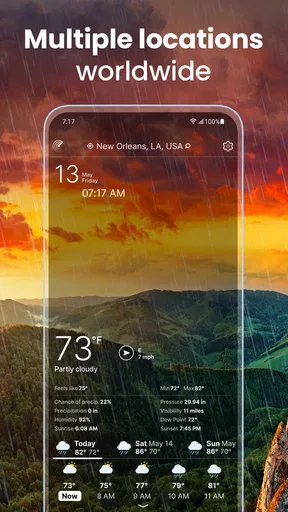
Now, let’s talk features because this app sure isn't lacking in them. Weather Live° offers a detailed forecast that covers the next seven days. You can scroll through the days to see highs, lows, and a brief description of the expected weather. It’s nothing groundbreaking but definitely useful.
Worth Reading Before You Choose

ESPN’s Live Game View Makes Following Close Games Easier

QuizzLand Review: A Good Fit for Short Trivia Breaks, Not Every Player

Basketball Stars: Multiplayer Is Fast, but Can It Recover When Matches Go Wrong?

WEBTOON Turns Phone Updates Into a Better Reading Routine

Link to Windows Runs on Shared Habits, Not Social Feeds

How Alibaba.com Dominates the B2B Marketplace
One thing I particularly liked is the hourly forecast. It allows you to see how the weather will change throughout the day. This is perfect if you’re planning a picnic or an outdoor adventure and need to know exactly when to avoid the rain.
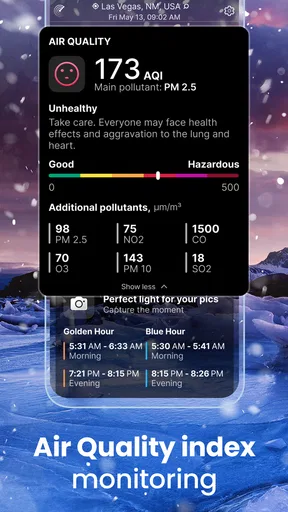
Oh, and if you’re a weather nerd like me, you’ll appreciate the wind speed and direction indicators, atmospheric pressure, and humidity levels. The app even lets you adjust the units (Celsius/Fahrenheit, km/h/mph), which is a nice touch if you’re traveling or just prefer one over the other.
Making the forecast useful in real life
The hourly view is most valuable when I use it to choose a window, not to promise myself a precise outcome. Imagine I have errands to run, a walk to fit in, and a forecast that suggests showers later. I can compare the hours, decide whether to go now or wait, and check wind and humidity as context. If the plan matters, I’ll look again just before leaving rather than assuming the morning forecast will stay unchanged all day.
A small but useful habit is to set the units once, then leave them alone. Switching between Celsius and Fahrenheit, or between kilometres per hour and miles per hour, is handy when preferences or travel change, but mixing units makes quick comparisons harder. I’d also pay attention to wind direction and speed when planning a bike ride or an exposed walk: a temperature that looks comfortable can feel very different with a headwind. These details are more useful together than as isolated numbers.
The week-ahead view is better for broad planning than for locking in a precise outdoor schedule. I use it to spot likely changes and decide whether a flexible plan is sensible; for the exact timing of an outing, the hourly forecast is the more actionable place to look. That distinction helps prevent a common weather-app mistake: treating a multi-day outlook as if it were a firm appointment.
Customization and Widgets
What’s an app without a bit of personalization, right? Weather Live° allows you to tweak the layout and units to fit your preference. I found it quite intuitive to change the settings, and it didn’t take much to get everything just how I liked it.
The app also offers a selection of widgets you can add to your home screen. This means you don’t even need to open the app to get a quick glance at the weather. I tried out a couple of these widgets, and they updated consistently, which is crucial for staying informed.
What widgets change about the routine
A widget is most helpful when it answers a repeated question at a glance. I’d put one where I naturally look while getting ready, then use the full app only when the day’s forecast could change what I pack or when I leave. That keeps the home screen useful without turning a quick check into a habit of repeatedly opening the app for reassurance.
There is a trade-off: a compact widget cannot replace the detail of the hourly forecast or the weather map. I treat it as a prompt to check conditions, not as the only source for decisions involving a long drive, an outdoor event, or a day away from familiar surroundings. If your home screen is already crowded, the widget is optional; the app remains useful without making it the centre of your phone.
Performance and Usability
Performance-wise, Weather Live° has been smooth sailing. I’ve had no issues with lagging or crashing, which is always a concern with apps that update frequently in the background. The refresh rate of the data is pretty decent, ensuring that what you’re seeing is up-to-date.
In terms of user experience, I’d say the app is quite intuitive. Even if you’re not tech-savvy, you’ll likely find it straightforward to use. The icons are self-explanatory, and the navigation is logical.
Maps, alerts, and sensible expectations
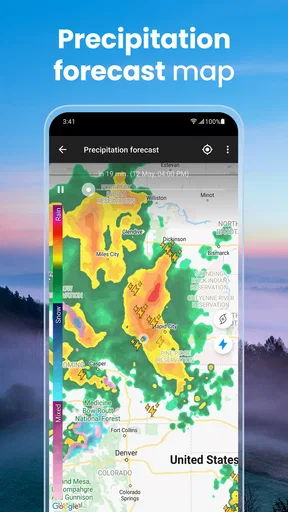
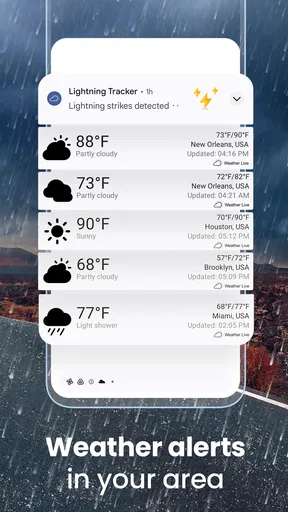
The weather map and alerts make this more than a quick glance at the sky, but I would use them with a clear purpose. A map is useful when I want broader visual context around changing weather, while an alert can bring attention to conditions worth checking before I head out. Neither removes the need to use judgement: local conditions can differ from what a general view suggests, and an alert is a cue to review plans, not a reason to assume every location is affected in the same way.
For a practical routine, I’d check the local forecast first, then consult the map if the weather looks unsettled or my route takes me across a wider area. Before outdoor plans, I’d also make sure alerts are set in a way I can notice without becoming distracting. The balance matters: too little attention can mean missing a useful warning, while checking every detail repeatedly can make a forecast feel more certain than it is.
Location access is part of getting local conditions conveniently, but it need not be the only way to think about using a weather app. If you prefer not to share your location, consider whether entering or selecting a place manually in your usual weather tool meets your needs; check the available controls on your device before deciding. For travel, I would verify the destination rather than assume a home-area forecast will be relevant once I’m elsewhere.
How it compares with other weather choices
Compared with the built-in weather view many people already have, Weather Live° is attractive if you want a more visual presentation, widgets, and a fuller set of conditions in one place. The built-in option may still be the better fit if you want the fewest setup steps and only check the temperature occasionally. There is no need to switch simply because a dedicated app exists; the extra interface is worthwhile only if it helps you make decisions.
Some people prefer map-first weather tools, especially when they are tracking a moving weather system or planning a route across a large area. Others want a minimalist forecast with little beyond current conditions and a short outlook. Weather Live° sits between those approaches: it gives a familiar forecast-led experience while also offering map and alert tools. If you depend on specialized local reporting or need a particular professional data source, a dedicated service may suit you better. I’d compare the information you actually use rather than choosing by the length of a feature list.
The cost of switching is mostly practical rather than complicated: you need to set your preferred units, decide whether to use location access, and choose whether a widget earns a place on your home screen. If your current app already provides the forecast and alerts you rely on, moving may add little. If you often open several screens just to work out whether the weather will interfere with your plans, having the forecast and supporting details together may be a worthwhile change.
Free to start, with optional spending
The app is free to download, with in-app purchases ranging from $0.99 to $81.99 per item. I’d start with the free experience and only consider spending if a specific paid option clearly solves a problem for you. The range is wide enough that I would check the purchase details in the app before confirming anything, rather than assuming every useful feature requires payment or that every purchase is relevant to my needs.
That approach is especially sensible for a utility you may check briefly each day. Try the forecast, map, alerts, and widget in your normal routine first; then decide whether anything missing genuinely gets in the way. A weather app should earn its place through useful decisions, not through a long session of exploring settings or buying extras you may rarely use.
Who will get the most from it
I’d recommend Weather Live° to someone who checks the weather before commuting, taking a walk, gardening, or planning flexible outdoor time, and who likes seeing more than a single current-condition card. It is also a reasonable fit for people who want a home-screen glance and an app they can open when the day’s forecast needs closer attention. Its general-audience rating and straightforward layout make it approachable even if you do not care about every atmospheric measurement.
I would skip it if you want a bare minimum screen, dislike widgets and visual elements, or already trust another forecast source that fits your routine. I’d also avoid relying on one app alone for decisions where a wrong call could have serious consequences. Weather information is useful, but it is still a forecast; for high-stakes travel or outdoor work, check current official advisories and use the guidance relevant to your area.
Final Thoughts
So, is Weather Live° worth downloading? If you’re on the hunt for a reliable, user-friendly weather app, I’d say absolutely. It covers all the basics and then some, with a clean interface and helpful features like hourly forecasts and widgets. It’s definitely one of those apps that I’ve found myself opening more than I expected.
Whether you’re a weather enthusiast or just someone who likes to know if they should carry an umbrella, Weather Live° has you covered. So, go ahead, give it a try, and see if it becomes your go-to weather app too!
My recommendation
My advice is to try it for the decisions you make repeatedly: what to wear, when to leave, and whether an outdoor plan needs a backup. Use the hourly view for timing, the broader outlook for flexibility, and the map or alerts when conditions look unsettled. If those checks feel clearer and quicker than your current routine, it has earned its place. If you only need a temperature once in a while, your phone’s simpler option may be enough.
Overall, I see it as a capable everyday choice rather than a specialist forecasting tool. The mix of accessible visuals and more detailed conditions gives it room to serve casual checks and thoughtful planning alike, while the optional purchases mean I would judge the free experience first. That is the recommendation I’d give a friend: install it if you want a fuller weather routine, keep your expectations realistic, and let the forecast inform—not dictate—your plans.
Pros
- Real-time weather updates.
- Customizable weather widgets.
- Accurate weather forecasts.
- User-friendly interface.
- Detailed radar maps.
Cons
- Ads can be intrusive.
- Some features require premium.
- Battery consumption is high.
- Occasional data refresh issues.
- Limited offline functionality.
FAQs for Weather Live°
What features does Weather Live° offer?
Weather Live° provides real-time weather updates, a 7-day forecast, and detailed weather conditions such as humidity, precipitation, and wind speed. The app also includes customizable weather widgets, severe weather alerts, and animated weather radar maps to help users stay informed about upcoming weather changes.
Is Weather Live° available for both Android and iOS devices?
Yes, Weather Live° is available for download on both Android and iOS platforms. The app is designed to provide a seamless user experience across different devices, ensuring that you can access weather information anytime, anywhere, whether you are using a smartphone or a tablet.
Does Weather Live° consume a lot of battery or data?
Weather Live° is optimized to minimize battery drainage and data usage. It updates weather information efficiently to ensure that users receive the most accurate data without significantly impacting device performance. However, using features like animated radar maps may slightly increase data consumption.
Can I customize the weather alerts in Weather Live°?
Yes, Weather Live° allows users to customize weather alerts based on their preferences. You can set alerts for severe weather conditions, temperature changes, or precipitation forecasts. This feature helps users stay ahead of unexpected weather events, ensuring they are prepared for any situation.
Is there a premium version of Weather Live° and what does it offer?
Weather Live° offers a premium version that provides an ad-free experience along with additional features like extended forecast details, more advanced weather maps, and enhanced widget customization. The premium version is ideal for users who want a more comprehensive weather tracking experience.


